One app for the roster, the schedule,
the dues and the drills.
Every team in your program, in one place, on the phone that is already in your pocket. Parents stop asking what time. Players get something to do between practices. And the fan store pays the program back instead of billing it.

Right now your program runs on this.
- A group chat for the parents.
- A second one for the coaches.
- A spreadsheet for who has paid.
- A note on someone's phone for the batting order.
- A binder in a truck for the plays.
- And one volunteer who knows where all of it is.
It works until that person is on vacation. Skipper is the version where it does not depend on them.
Practice does not end at practice.
The kids who get better are the ones putting in reps in the driveway. Skipper gives them something specific to do, and a reason to come back tomorrow.
- Drills picked for their position, most doable alone or with one parent
- A streak for training on back-to-back days
- Badges and a team leaderboard, so the work is visible
- Position paths that build one skill in order

The clipboard, the binder,
and the group chat.
All the things you currently keep in three places and your head. Built to be used one-handed, at a field, between innings.
- A playbook where the plays actually move, frame by frame
- Practice plans with drills and video, assigned to a group or one kid
- Lineups and depth charts you drag into shape and publish
- Tryouts from a public signup link through to a scored board

The group chat,
minus the group chat.
Team and club channels that follow the roster, and direct messages with one rule the database will not let anyone break: a conversation with a player in it has that player's parents in it too.
- No adult is ever alone in a thread with someone's kid — enforced by the database, not by a policy nobody reads
- A channel per team and one for the club. Add a player to the roster and they are in it
- Photos, replies, reactions and @mentions. Report a message and staff see it, even if it is deleted after
- A push when something arrives, quiet hours respected — a rainout still gets through

Know what you are owed.
And what you spent.
Every team, every age group, one set of books and one calendar. The people who need to see it can, and the people who should not, cannot.
- One calendar for games, practices and facility bookings
- Dues, who has paid, and what went out, in one ledger
- A team store that doubles as a fundraiser — every order sends money back to the program
- Announcements and RSVPs that reach families, not a chat nobody reads

Everything else it does
Not modules you pay extra for. Just what is in the app.
Animated playbook
Draw a play, set the frames, watch it run. Routes and timing on any phone.
Training and badges
Position drills, streaks and a leaderboard that turns solo reps into competition.
Practice plans
Section by section, with drills and video, targeted at whoever needs it.
Schedule and RSVP
Games, practices and facilities on one calendar, with a live headcount.
Team messaging
Channels that follow the roster, supervised DMs, photos, replies and mentions.
Fan store
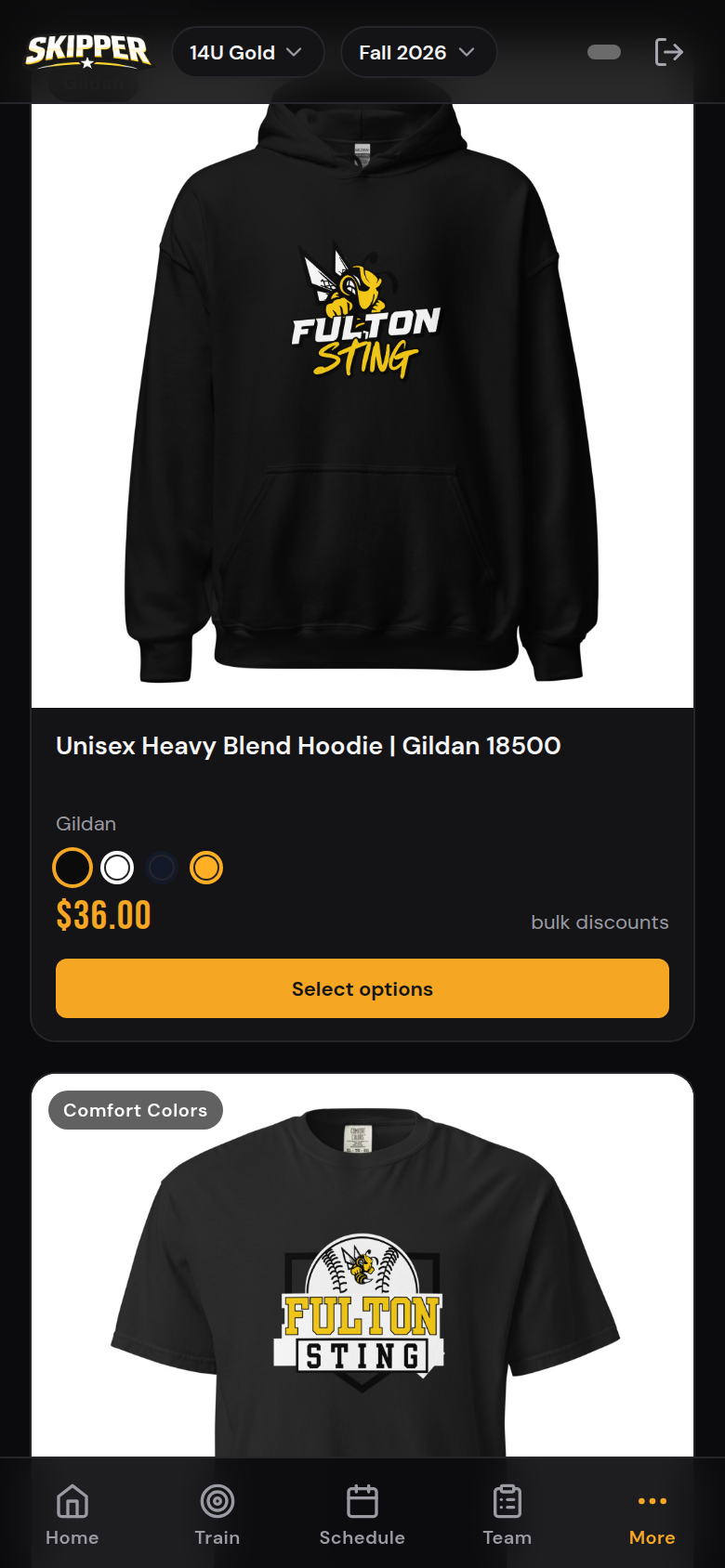
Your logo on apparel families would buy anyway. Printed and shipped for you, and every order sends money back.
Tryouts
A signup link per team feeds an evaluation board. Score, offer, add to roster.
Team finances
Dues owed, dues paid, money out. One ledger the whole staff can see.
Invite links
One link per team. Families land in the right place with the right role.
Installs like an app
Add to the home screen. No app store, and the shell works with bad signal.
Every store order sends money back to your team.
On the Program plan and above.
A fundraiser that is already on your roster.
Team management software that costs four figures a team does not fund your program. It is another line item your families cover.
Skipper goes the other way. Your program gets a store — hoodies, hats, jerseys, drinkware — carrying your own logo, stocked with the things your families were going to buy anyway. Every order is printed and shipped for you, so you hold no inventory and pay nothing up front.
On the Program plan and above, every order sends money back to your team — an ordinary season of team gear, turned into a fundraiser nobody had to organise. Starter storefronts get the store itself. Either way the app keeps a running total of what your store has earned, what has been paid out and what is still owed.
- You design it
- Families order
- We print and ship it
- Money comes back
Set it up before your next practice
No onboarding call. No data migration. No sales engineer.
Create the org
Name it, pick your sport. About a minute, and no card.
Add teams and players
Age groups, teams, roster. Kids can play up across more than one team.
Drop the link in the chat
One link. Parents, players and coaches land in the right team with the right access.
Run the season
Post the schedule, publish the lineup, assign the drills. They see what you share.
No team? Train anyway.
You do not need a club, a coach or an invite code. Make an account and you get the same drill library, the same courses and the same badges every rostered player gets — and a streak that counts every day you show up.
- Drills you can do on your own, or with one other person
- Position courses that build toward a badge
- A streak, and a board you can join under a handle instead of your name
- Join a club later and every rep you logged comes with you
Nobody to ask? Ask Skipper.
Not every kid has someone at home who played. Ask Skipper is a button on every screen that answers the questions a player is too far into the season to want to ask out loud — what a word means, what the idea behind it is, and what to go and work on.
- It is not a chatbot. Every answer is a sentence a coach wrote, out of the same playbook glossary the app uses everywhere else — so it cannot invent one.
- You tap, you do not type. It narrows down from what you are stuck on to a word, an idea, a play that uses it, or a drill you can go and do right now.
- It works with no signal. The whole thing is already on the phone, so a garage with one bar is the same as the kitchen table.
- "What should I work on?" is built from the questions that player has been getting wrong — named by the idea, not by a percentage.
- Nothing is scored, and none of it reaches a leaderboard. When it has not got the answer, it says so and names a person to ask.
Free on every plan, including for players with no team.
What do you want help with?
- A word I don’t understandEvery word your playbook uses, in plain language
- What should I work on?Built from the questions you have been missing
- Find me a drillBy what you have got, how long you have, or what you play
- Something on a playWhat to run, and what each one is built on
What it looks like in the app.
Priced like it is run by a parent
Because it is. Start free, move up when the program grows, and on Program and above let the store fundraising go toward covering it.
- 1 team, up to 25 players
- Training, badges and leaderboard
- Messaging, announcements and notifications
- Lineups and depth charts
- Schedule, RSVP and invite links
- Fan store, printed and shipped for you
- Unlimited teams and players
- Everything in Starter
- Store fundraising — every order sends money back to your program, plus team finances
- Practice plans, playbook, courses and challenges
- Tryouts
- Org admin dashboard
- Priority support
- Everything in Program
- Multiple sports under one org
- White-label branding
- Facility booking and availability
- SSO and SAML
- Dedicated support
Training on your own, with no team? Skipper is free for individual players — drills, badges, streaks and the leaderboard, no card needed. Start training free →
One place. Every team.
Starting tonight.
Set your program up in the time it takes to drive to practice.
Start free trial